The best free piano app for iPhone or iPad is the one whose free tier still does the specific thing you opened it for. That thing is different for a seven-year-old, for an adult coming back after twenty years, for someone with a MIDI keyboard on the desk, and for someone with no intention of learning to read music. Almost every piano app in the App Store is free to download, and most stop being free at the exact moment you try the thing you came for. Free to download and free to use are two different claims, and only the second one decides anything.
That's not a scam, it's just how these apps are built. But it means "what's the best free piano app" is the wrong question on its own. The useful version is "best free piano app for me", so the five answers below are sorted by who is asking rather than by rank.
Which free piano app fits you? Five answers, by who's asking
The apps are not interchangeable. Simply Piano, Flowkey and Yousician are built as graded courses and are subscription-first, so the free version is generally a taste before the paywall. A second kind of app has no curriculum at all and exists to let you play songs, improvise and record, and that is the lane Piano Aura sits in. Which kind is right depends far less on the app than on which of these five people you are. All of this is accurate as of September 2026; free tiers change, so re-check the one you pick.
"My 7-year-old wants to learn piano, which free app?"
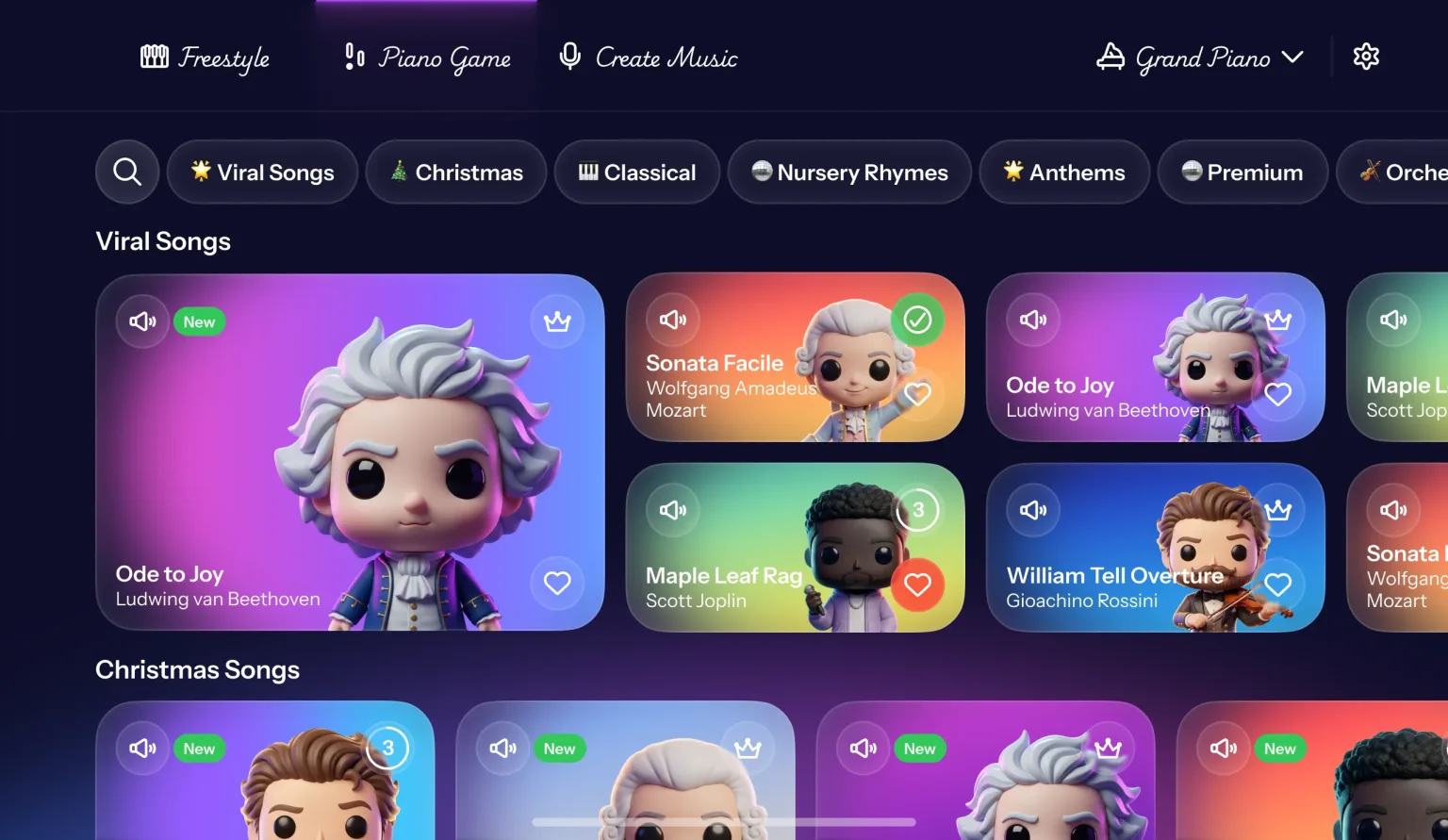
For a primary-school-age child, choose an app whose first session produces a recognisable song rather than a lesson: Piano Aura's falling-note Piano Game mode needs no note-reading to start, while Simply Piano, Flowkey and Yousician are graded courses better suited to an older learner who will work through a curriculum in order.
What decides it at this age is whether the first sitting ends in a song. A graded course assumes a learner who will follow lessons in order and come back tomorrow for lesson two; most seven-year-olds will not. A falling-note mode asks only that they press a key when the block reaches it, so a tune they recognise arrives within minutes. Two honest caveats: plan to sit with them at first, and no app can see their hands, so if lessons are affordable at all, this is the age at which they pay for themselves.
"I'm an adult coming back to piano after years away"
A returning adult should skip the graded-course apps and pick one that opens straight into playing: Piano Aura's Freestyle keyboard and song catalog let you go back to real pieces on day one, whereas Simply Piano, Flowkey and Yousician restart you at the beginning of a curriculum you have already been through once.
You are not a beginner, and being treated as one is what makes returning players quit in week two. A course app starts you at middle C, which is the right design for someone who has never played and a demoralising one for someone rebuilding what they used to have. What restores the habit is repertoire: a piece you already know the sound of, played badly at first, then less badly. The honest exception is reading: if your notation has gone and you want it back, a structured course rebuilds it faster than playing by ear will.
"I already own a MIDI keyboard: does the app matter?"
If a MIDI keyboard is your main instrument, pick an app that names MIDI input on its App Store page and test its latency during the free trial; Piano Aura is designed to be played on the iPhone or iPad screen, so it is the wrong choice for someone who wants to play on their own keys.
The input method decides everything here. There are three ways an app can hear you. MIDI over USB-C, Bluetooth or a network connection sends the exact notes you played, with negligible delay. A microphone listening to an acoustic piano works with whatever instrument you own, but room noise and a piano that has drifted out of tune both confuse it. Screen-only apps ignore your keyboard entirely. Test latency on a fast passage before you subscribe: a delay you can hear is one you cannot play through.
"I don't want to learn to read sheet music"
You can learn to play piano without reading sheet music, and the apps that allow it use a falling-note or piano-roll display rather than a staff: Piano Aura's Piano Game mode works this way, while Simply Piano, Flowkey and Yousician teach standard notation as part of their courses.
Playing and reading are separate skills and only one is required to make music. A falling-note display tells you which key and when, so you learn the piece through your hands rather than through the page. Course apps teach reading because a curriculum has to go somewhere. Neither route is cheating. The honest note is that reading does open up repertoire eventually, and it is far easier to pick up once playing is a habit than as the entry fee for starting at all. More on this in how to play piano without reading sheet music.
"What's the best free piano app for iPad?"
On iPad the shortlist is the same as on iPhone, but the larger screen makes a screen-played app genuinely two-handed: Piano Aura runs on both from a single free download, and the deciding question stays how much of the free tier survives once you actually start playing.
The App Store versions are usually the same app on both devices, so the candidates do not change. The on-screen keyboard does, and that is the whole difference. An iPad shows enough keys to use both hands at once; the octave and a bit that fits on an iPhone is fine for a melody and cramped for anything else. So on iPad a screen-played app competes far more evenly with a course app, and "free" is worth more because you can use what's free. Try a screen keyboard first on our free online piano keyboard, before installing anything.
If the real problem is that you can't get a teacher
For a lot of people the app is not the first choice. It is the thing they reach for after the teacher fell through, and that changes which app is right. Three versions of this come up constantly, and they have different answers.
Lessons cost more than you can spend. A weekly hour with a teacher is usually the most expensive line in a beginner's month, and no app is competing with that on price. What an app genuinely replaces here is the practice time between lessons: the repetition, the slow passes, the "play it again" that a teacher would otherwise spend your paid hour supervising. Use the app for volume and keep a human for the things below.
There is no teacher to hire. This is more common than it sounds, especially outside cities. People wait months on a music-school list for a piano slot that never opens. If that's you, an app is not a compromise, it's the only option on the table, and the thing to optimise for is whether you can keep showing up. Pick the one that gets you playing something you recognise on day one, because motivation is the only resource you actually have.
You can afford a teacher, but only twice a month. This is the best case, and the one where app choice matters most. Two lessons a month gives you correction; the app gives you the other twenty-six days. A play-and-record app is unusually useful here, because a recording is something you can bring to the lesson and ask about.
Now the honest part. An app cannot see your hands. It cannot tell you that your wrist is collapsing, that you're reaching with the arm instead of the finger, or that the tension in your shoulders is why the fast passage keeps failing. Those are the injuries and habits a teacher catches in ten seconds and an app will never catch at all. If you go the app-only route, film yourself from the side occasionally and compare it against how a pianist actually sits. It is a poor substitute for a teacher, and it is much better than nothing.
What to check before you commit
A few things tell you fast whether an app respects your time:
How much works without paying. Download it and try the thing you came for. If the first song or the basic keyboard is locked, you've learned something.
Whether you need real gear. Some apps assume you've got a MIDI keyboard plugged in. Others work entirely on the phone screen. Neither is wrong, but know which one you're getting before you're annoyed.
Whether you can keep what you make. If you record a take or learn a song, can you save it, play it back, send it to someone? An app that lets your playing disappear the moment you close it is missing the best part.
Run this five-minute test before paying
Ignore the welcome screens and test the core loop straight away. Open one song or lesson and see how far you can get without starting a trial. Open the keyboard and check whether it plays immediately or asks for hardware. Record ten seconds, close the screen, and confirm that the take is still there when you return.
Then look at the subscription screen. You do not need to reject subscriptions on principle. You need to know which exact problem the payment solves. A larger song catalog may be worth it if songs keep you practising. A structured course may be worth it if you finish lessons in order. If the paid plan mostly removes limits from features you did not enjoy for free, the answer is already no.
For a closer look at the lesson-first options, read Simply Piano vs flowkey vs Yousician. If avoiding a recurring payment is the main constraint, the best free piano app with no subscription tackles that question directly.
Where Piano Aura fits
I'll be straight about ours. Piano Aura is free to download and play, it runs on both iPhone and iPad from one download and works on the screen with no extra keyboard, and you can do three things in it: follow songs with the falling-note Piano Game mode (how to play piano without reading sheet music goes into that), improvise on the Freestyle keyboard, and record what you play. Some instruments and part of the song catalog are premium, and the recording metronome is too, so it isn't all free forever. But the core loop of playing and recording is there without paying.
It is not a lesson course. If you want a teacher in your pocket marking your hand position, one of the curriculum apps will serve you better. If you want to sit down, play, and keep what you make, that's what we built it for.
Common questions
What is the best free piano app for iPhone? There isn't one winner, because the apps do different jobs. For structured lessons, a course app like Simply Piano, Flowkey, or Yousician is strongest, though those are subscription-first. To play songs and create without a subscription, a play-and-record app like Piano Aura keeps the core loop free.
Are any piano apps completely free? Very few stay free forever. Most are free to download and then charge for the full catalog, advanced lessons, or extra instruments. The honest question is whether the part you came for stays free, so try that part before you pay.
Do I need a keyboard to use a free piano app? Not always. Some apps expect a MIDI keyboard, while others run entirely on the iPhone screen. Check which one an app assumes before you download it.
Is there a free piano keyboard app for iPhone? Yes. Some apps give you a playable piano keyboard right on the screen for free, with no MIDI controller needed. Piano Aura's Freestyle keyboard is free to play and record on, so your iPhone becomes a pocket piano the moment you open the app.
What is the best piano app for iOS? The same answer applies across iPhone and iPad, because the App Store versions are usually the same app. Decide by job first: a course app for graded lessons, a play-and-record app to play songs and keep recordings. Then check what the free tier still allows on your device.
Is there a good free piano app for iPad? Yes, and the shortlist is the same as on iPhone because the App Store versions are usually the same app. What changes is that an iPad screen fits enough keys to play with both hands, so a screen-played app such as Piano Aura is a more serious option there than on a phone. The free-tier question does not change: check how much of what you came for still works before a subscription screen appears.
Can a free piano app replace piano lessons? Not entirely, and it is worth being clear about where the line falls. An app can carry the repetition, the song learning, and the daily habit, which is most of the hours. It cannot watch your hands, so posture, wrist tension, and fingering problems go uncorrected, and those are the things that cause injuries and plateaus. If lessons are out of reach on price or simply not available where you live, an app plus occasional self-filming is a reasonable plan. If you can manage even one lesson a month, spend it on technique and let the app do the practice.
Which free piano app is best for a complete beginner? One that gets you playing something recognisable in the first session. Beginners quit over boredom far more often than over difficulty, so a mode that hands you a song you know beats a lesson tree you have to earn your way through. Reading comes later, and it comes easier once playing is already a habit.
The short version
Don't pick by the word "free." Pick by what you want to do, then check how much of that is free once you start. If you want lessons, go subscription. If you want to play and create, start with a play-and-record app and only pay when something's actually worth paying for.
Piano Aura is free on the App Store if you want to try the second route.